
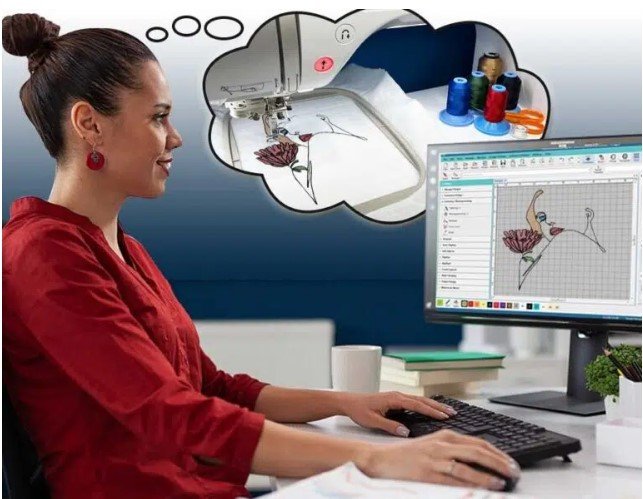
When it comes to embroidery, knowing how to convert artwork to OFM file format is crucial for achieving professional, machine-ready designs. OFM files, widely used in commercial embroidery machines such as Tajima, Melco, and Barudan, store all the essential stitching information like stitch types, thread colors, density, and sequence. A proper conversion ensures that your artwork retains its original quality, detail, and precision in every stitch. For businesses, designers, and hobbyists alike, mastering this process is the key to producing clean, consistent embroidery results without wasting time or materials.
In this article, we’ll break down the process, share expert tips, and explain why a high-quality OFM conversion can elevate your embroidery projects.
Understanding the OFM File Format
Before converting your artwork, it’s important to understand the OFM format. Unlike simple image files, OFM is a proprietary embroidery file format that includes:
- Stitch Instructions: The exact placement and sequence of each stitch
- Thread Information: Colors, type, and order to match your design
- Stitch Density and Length: Ensuring smooth embroidery without puckering
- Design Dimensions: Accurate sizing and alignment for your project
Understanding these elements allows you to make the right adjustments during the conversion process, ensuring your design is ready for any commercial embroidery machine.
Preparing Your Artwork
High-quality conversion starts with high-quality artwork. Your original design will determine how well it translates into an OFM file. Follow these tips to prepare your artwork:
- Use Vector Files: AI, EPS, or SVG files are preferred over raster images because they are scalable without losing quality.
- Simplify Complex Designs: Extremely intricate details may not stitch well; simplify small elements to maintain clarity.
- High Resolution: If using raster images like JPG or PNG, ensure at least 300 dpi for sharp results.
- Clean Colors and Outlines: Clear color separation and defined outlines make digitizing easier and more accurate.
Properly prepared artwork minimizes errors during digitizing and ensures the final embroidery is precise.
Digitizing: The Core of OFM Conversion
Converting your artwork to OFM is not just a file format change it’s a digitizing process, where your design is translated into precise stitch instructions. Proper digitizing is essential for maintaining stitch quality.
Key Digitizing Considerations
- Stitch Types: Use satin stitches for text, fill stitches for solid areas, and running stitches for fine details.
- Stitch Direction: Align stitch angles to complement the design’s flow.
- Density Control: Adjust stitch density based on fabric type to prevent puckering or gaps.
- Underlay Stitches: Provides stability to the fabric and ensures clean top stitches.
- Color Sequencing: Properly assign thread colors for accurate final results.
Using professional embroidery software gives you control over every stitch and ensures your design is optimized for your specific machine.
Step-by-Step OFM File Conversion
Once your artwork is digitized, you’re ready to convert it into OFM format. Here’s how:
- Import Artwork: Load your AI, EPS, SVG, or high-resolution image into your embroidery software.
- Digitize the Design: Apply stitch types, set density, and define thread colors.
- Preview the Stitching: Most embroidery software allows simulation to detect gaps, overlaps, or errors.
- Export as OFM: Save the design in OFM format for use on commercial embroidery machines.
- Test Stitch: Always stitch a sample to check accuracy and quality before mass production.
Following this process ensures your OFM file is accurate, machine-ready, and high-quality.
Fabric and Thread Considerations
Different fabrics respond differently to embroidery. A design that looks perfect on cotton may not work well on denim or polyester. Adjust your OFM file accordingly:
- Lightweight Fabrics: Reduce stitch density to prevent puckering.
- Heavy Fabrics: Increase underlay and backing for stability.
- Small Designs: Adjust stitch length to maintain clarity and prevent overcrowding.
These adjustments will make sure your embroidery looks professional on every material.
Common Mistakes to Avoid
Even experienced digitizers can encounter issues. Avoid these common mistakes:
- Using low-resolution artwork
- Skipping the test stitch
- Overcomplicating the design with too many fine details
- Ignoring stitch density or underlay
Being mindful of these pitfalls can save time, thread, and material, while guaranteeing clean embroidery results.
Benefits of Professional OFM Conversion
Choosing a professional service for convert artwork to OFM file format offers multiple advantages:
- Machine-ready files compatible with commercial embroidery machines
- Accurate stitch placement for high-quality embroidery
- Time-saving and reduced production errors
- Consistent results across multiple garments
A well-converted OFM file ensures your embroidery projects are efficient, accurate, and visually appealing.
Conclusion
Converting artwork to OFM file format without losing stitch quality involves preparation, digitizing, and careful testing. By starting with high-quality artwork, using the right digitizing techniques, and making fabric-specific adjustments, you can produce professional embroidery results every time.
For those seeking reliable and high-quality OFM file conversion services, Digitizing Buddy provides expert solutions that transform your designs into machine-ready, flawless embroidery files with precision and efficiency.
